Bug #6240
open
Unable to use *_vaapi codec Profies
0%
Description
Hi,
i try to use vaapi transcoding with tvheadend.
When i create a codec profile i can select all vaapi codecs. But when i create the profiles the Type is <unknown> and the codec profile can not be enabled.
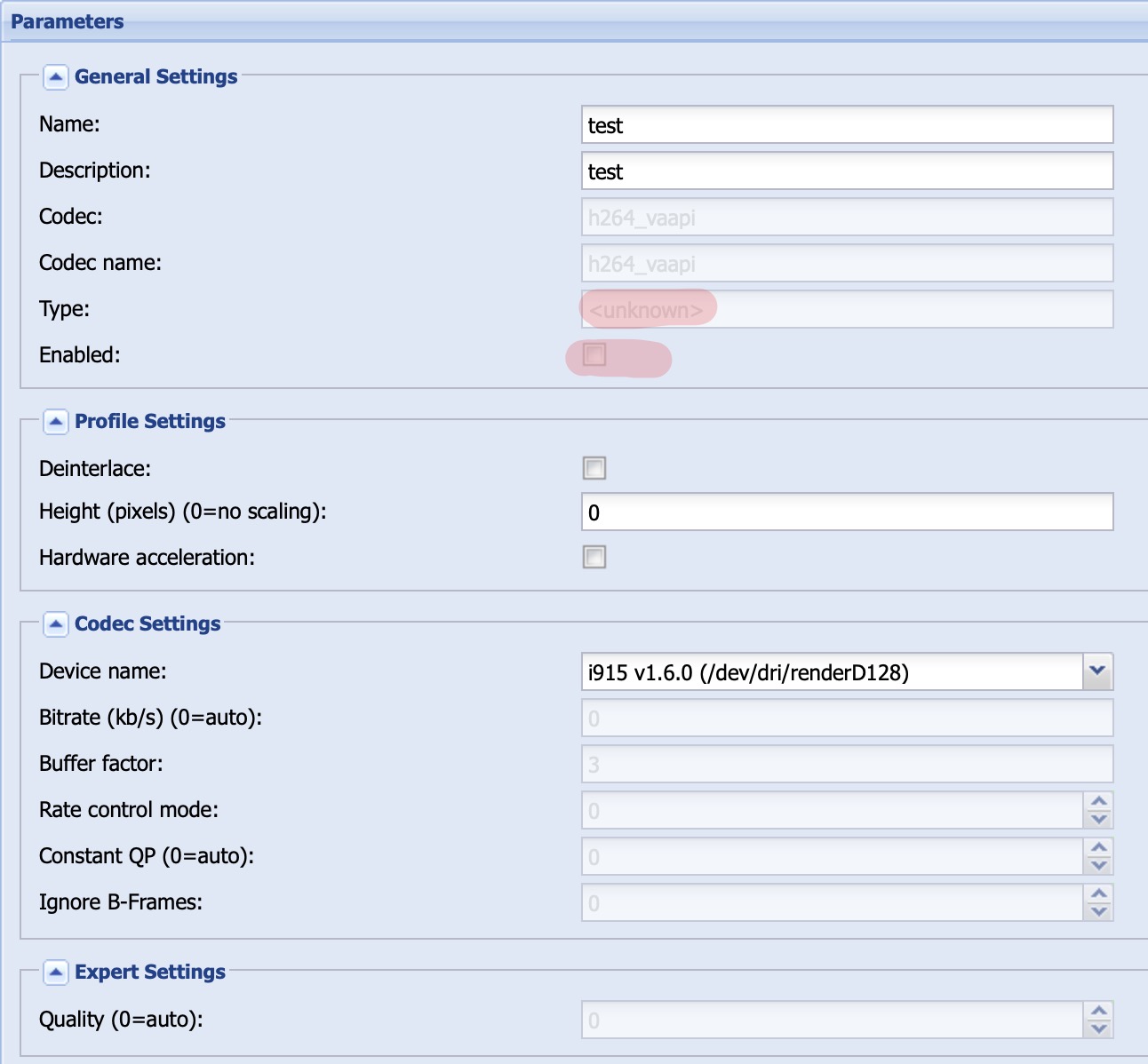
I've tried it with Ubuntu 22.04 (Kernel 5.15) and 22.10 (Kernel 5.19). On both systems, the same behavior. The vainfo looks good for my perspective:
error: XDG_RUNTIME_DIR is invalid or not set in the environment.
error: can't connect to X server!
libva info: VA-API version 1.15.0
libva info: Trying to open /usr/lib/x86_64-linux-gnu/dri/iHD_drv_video.so
libva info: Found init function __vaDriverInit_1_14
libva info: va_openDriver() returns 0
vainfo: VA-API version: 1.15 (libva 2.12.0)
vainfo: Driver version: Intel iHD driver for Intel(R) Gen Graphics - 22.4.3 ()
vainfo: Supported profile and entrypoints
      VAProfileNone                   :    VAEntrypointVideoProc
      VAProfileNone                   :    VAEntrypointStats
      VAProfileMPEG2Simple            :    VAEntrypointVLD
      VAProfileMPEG2Main              :    VAEntrypointVLD
      VAProfileH264Main               :    VAEntrypointVLD
      VAProfileH264Main               :    VAEntrypointEncSliceLP
      VAProfileH264High               :    VAEntrypointVLD
      VAProfileH264High               :    VAEntrypointEncSliceLP
      VAProfileJPEGBaseline           :    VAEntrypointVLD
      VAProfileJPEGBaseline           :    VAEntrypointEncPicture
      VAProfileH264ConstrainedBaseline:    VAEntrypointVLD
      VAProfileH264ConstrainedBaseline:    VAEntrypointEncSliceLP
      VAProfileVP8Version0_3          :    VAEntrypointVLD
      VAProfileHEVCMain               :    VAEntrypointVLD
      VAProfileHEVCMain               :    VAEntrypointEncSliceLP
      VAProfileHEVCMain10             :    VAEntrypointVLD
      VAProfileHEVCMain10             :    VAEntrypointEncSliceLP
      VAProfileVP9Profile0            :    VAEntrypointVLD
      VAProfileVP9Profile1            :    VAEntrypointVLD
      VAProfileVP9Profile2            :    VAEntrypointVLD
      VAProfileVP9Profile3            :    VAEntrypointVLD
      VAProfileHEVCMain422_10         :    VAEntrypointVLD
      VAProfileHEVCMain444            :    VAEntrypointVLD
      VAProfileHEVCMain444            :    VAEntrypointEncSliceLP
      VAProfileHEVCMain444_10         :    VAEntrypointVLD
      VAProfileHEVCMain444_10         :    VAEntrypointEncSliceLP
There is an Intel(R) Celeron(R) N5100 (JasperLake) installed.
00:02.0 VGA compatible controller [0300]: Intel Corporation JasperLake [UHD Graphics] [8086:4e61] (rev 01)
Tvheadend is compiled with following parameters:
Configure arguments:
  --build=x86_64-linux-gnu --prefix=/usr --includedir=${prefix}/include --mandir=${prefix}/share/man --infodir=${prefix}/share/info --sysconfdir=/etc --localstatedir=/var --disable-option-checking --disable-silent-rules --libexecdir=${prefix}/lib/tvheadend --disable-maintainer-mode --disable-dependency-tracking --enable-vaapi --arch=x86_64

Compiler:
  Using C compiler:                        cc
  Using LD flags:                           -ldvbcsa
  Build for arch:                          x86_64

Binaries:
  Using PYTHON:                            python
  Using GZIP:                              gzip
  Using BZIP2:                             bzip2

Options:
  pie                                      yes
  ccdebug                                  no
  cardclient                               yes
  cwc                                      yes
  cccam                                    yes
  capmt                                    yes
  constcw                                  yes
  linuxdvb                                 yes
  satip_server                             yes
  satip_client                             yes
  hdhomerun_client                         yes
  hdhomerun_static                         yes
  iptv                                     yes
  tsfile                                   yes
  dvbscan                                  yes
  timeshift                                yes
  trace                                    yes
  avahi                                    yes
  zlib                                     yes
  libav                                    yes
  ffmpeg_static                            yes
  libx264                                  yes
  libx264_static                           yes
  libx265                                  yes
  libx265_static                           yes
  libvpx                                   yes
  libvpx_static                            yes
  libtheora                                yes
  libtheora_static                         yes
  libvorbis                                yes
  libvorbis_static                         yes
  libfdkaac                                no
  libfdkaac_static                         no
  libopus                                  yes
  libopus_static                           yes
  nvenc                                    no
  vaapi                                    yes
  mmal                                     no
  omx                                      no
  inotify                                  yes
  epoll                                    yes
  pcre                                     no
  pcre2                                    yes
  uriparser                                yes
  ccache                                   no
  tvhcsa                                   yes
  bundle                                   no
  pngquant                                 no
  kqueue                                   no
  dbus_1                                   yes
  android                                  no
  gtimer_check                             no
  slow_memoryinfo                          no
  libsystemd_daemon                        no
  pcloud_cache                             yes
  ddci                                     yes
  cclang_threadsan                         no
  gperftools                               no
  execinfo                                 yes
  mmx                                      yes
  sse2                                     yes
  W_unused_result                          yes
  f_stack_protector                        yes
  f_stack_protector_strong                 yes
  f_stack_check                            yes
  f_PIE                                    yes
  fdatasync                                yes
  getloadavg                               yes
  atomic32                                 yes
  atomic64                                 yes
  atomic_time_t                            yes
  atomic_ptr                               yes
  bitops64                                 yes
  lockowner                                yes
  qsort_r                                  yes
  gmtoff                                   yes
  recvmmsg                                 yes
  sendmmsg                                 yes
  ifnames                                  yes
  py_gzip                                  yes
  bin_pkg_config                           yes
  bin_xgettext                             yes
  bin_msgmerge                             yes
  bin_gzip                                 yes
  bin_bzip2                                yes
  ssl                                      yes
  linuxdvbapi                              yes
  linuxdvb_ca                              yes
  upnp                                     yes
  bin_cmake                                yes
  stdcpp                                   yes
  libogg_static                            yes
  hwaccels                                 yes
  inotify_h                                yes
  inotify_init1                            yes
  dvbcsa                                   yes
  epoll_create1                            yes
  mpegts                                   yes
  mpegts_dvb                               yes

Packages:
  openssl                                  3.0.2
  zlib                                     1.2.11
  libpcre2-8                               10.39
  liburiparser                             0.9.6
  avahi-client                             0.8
  libva                                    1.14.0
  libva-drm                                1.14.0
  dbus-1                                   1.12.20

Installation paths:
  Prefix:                                  /usr
  Binaries:                                ${prefix}/bin
  Libraries:                               ${prefix}/lib
  Data files:                              ${prefix}/share
  Man pages:                               /usr/share/man
Tvheadend Version is:
HTS Tvheadend 4.3-2069~gc9a156a25
The system is running at Ubuntu 22.10 with Kerenl 5.19 at the moment:
Linux tvheadend 5.19.0-26-generic #27-Ubuntu SMP PREEMPT_DYNAMIC Wed Nov 23 20:44:15 UTC 2022 x86_64 x86_64 x86_64 GNU/Linux
Please let me know if you need further informations.
Thanks a lot.
Regards,
Manuel
Files
 Updated by saen acro over 3 years ago
Is TVH installed from DEB or installed via "make install"?
Is TVH user added to "Video" Group?
 Updated by Manuel Menz over 3 years ago
saen acro wrote:
Is TVH installed from DEB or installed via "make install"?
Is TVH user added to "Video" Group?
TVH is installed via Autobild.sh DEB.
Yes, the hts user is in the video group:
uid=113(hts) gid=118(hts) groups=118(hts),44(video),109(render)
Updated by saen acro over 3 years ago
Post About > toggle details frame content.
Is ffmpeg HW acceleration work?
Updated by Manuel Menz over 3 years ago
Yes, transcoding with the /dev/dri/renderD128 device is working with ffmpeg.
Updated by Manuel Menz over 3 years ago
saen acro wrote:
Post About > toggle details frame content.
I've already posted it in the first post. But i can post it again:
Configure arguments:
  --build=x86_64-linux-gnu --prefix=/usr --includedir=${prefix}/include --mandir=${prefix}/share/man --infodir=${prefix}/share/info --sysconfdir=/etc --localstatedir=/var --disable-option-checking --disable-silent-rules --libexecdir=${prefix}/lib/tvheadend --disable-maintainer-mode --disable-dependency-tracking --enable-vaapi --arch=x86_64

Compiler:
  Using C compiler:                        cc
  Using LD flags:                           -ldvbcsa
  Build for arch:                          x86_64

Binaries:
  Using PYTHON:                            python
  Using GZIP:                              gzip
  Using BZIP2:                             bzip2

Options:
  pie                                      yes
  ccdebug                                  no
  cardclient                               yes
  cwc                                      yes
  cccam                                    yes
  capmt                                    yes
  constcw                                  yes
  linuxdvb                                 yes
  satip_server                             yes
  satip_client                             yes
  hdhomerun_client                         yes
  hdhomerun_static                         yes
  iptv                                     yes
  tsfile                                   yes
  dvbscan                                  yes
  timeshift                                yes
  trace                                    yes
  avahi                                    yes
  zlib                                     yes
  libav                                    yes
  ffmpeg_static                            yes
  libx264                                  yes
  libx264_static                           yes
  libx265                                  yes
  libx265_static                           yes
  libvpx                                   yes
  libvpx_static                            yes
  libtheora                                yes
  libtheora_static                         yes
  libvorbis                                yes
  libvorbis_static                         yes
  libfdkaac                                no
  libfdkaac_static                         no
  libopus                                  yes
  libopus_static                           yes
  nvenc                                    no
  vaapi                                    yes
  mmal                                     no
  omx                                      no
  inotify                                  yes
  epoll                                    yes
  pcre                                     no
  pcre2                                    yes
  uriparser                                yes
  ccache                                   no
  tvhcsa                                   yes
  bundle                                   no
  pngquant                                 no
  kqueue                                   no
  dbus_1                                   yes
  android                                  no
  gtimer_check                             no
  slow_memoryinfo                          no
  libsystemd_daemon                        no
  pcloud_cache                             yes
  ddci                                     yes
  cclang_threadsan                         no
  gperftools                               no
  execinfo                                 yes
  mmx                                      yes
  sse2                                     yes
  W_unused_result                          yes
  f_stack_protector                        yes
  f_stack_protector_strong                 yes
  f_stack_check                            yes
  f_PIE                                    yes
  fdatasync                                yes
  getloadavg                               yes
  atomic32                                 yes
  atomic64                                 yes
  atomic_time_t                            yes
  atomic_ptr                               yes
  bitops64                                 yes
  lockowner                                yes
  qsort_r                                  yes
  gmtoff                                   yes
  recvmmsg                                 yes
  sendmmsg                                 yes
  ifnames                                  yes
  py_gzip                                  yes
  bin_pkg_config                           yes
  bin_xgettext                             yes
  bin_msgmerge                             yes
  bin_gzip                                 yes
  bin_bzip2                                yes
  ssl                                      yes
  linuxdvbapi                              yes
  linuxdvb_ca                              yes
  upnp                                     yes
  bin_cmake                                yes
  stdcpp                                   yes
  libogg_static                            yes
  hwaccels                                 yes
  inotify_h                                yes
  inotify_init1                            yes
  dvbcsa                                   yes
  epoll_create1                            yes
  mpegts                                   yes
  mpegts_dvb                               yes

Packages:
  openssl                                  3.0.2
  zlib                                     1.2.11
  libpcre2-8                               10.39
  liburiparser                             0.9.6
  avahi-client                             0.8
  libva                                    1.14.0
  libva-drm                                1.14.0
  dbus-1                                   1.12.20

Installation paths:
  Prefix:                                  /usr
  Binaries:                                ${prefix}/bin
  Libraries:                               ${prefix}/lib
  Data files:                              ${prefix}/share
  Man pages:                               /usr/share/man
 Updated by Alin Gherghescu over 3 years ago
Manuel,
if you have time to check the following tutorial: https://tvheadend.org/boards/4/topics/48572
Backup your HDD image (to restore it back later on) and follow that tutorial with OPTION 2 Gen11+ for N5000.
I can confirm was working on my case - except for hevc_vaapi :( for some reason.
Updated by Manuel Menz over 3 years ago
Hi Alin,
thanks for the link. Because you still have the problem with hevc_vaapi it seems to me that i'm not alone with that issue and it would be better to find the root cause of the issue.
Regards,
Manuel
Updated by Alin Gherghescu over 3 years ago
Manuel, in my case hevc_vaapi is found properly by TVH only that is generating some green artifacts ... but those are generated even if I spawn to ffmpeg.
My point is: that is not a TVH problem ... probably is a VAAPI driver problem.
The issue reported by you is unexpected (and different).
Follow the tutorial to confirm that rest of the codecs are working (h264 and vp9 ... you might have also vp8).
Updated by Alin Gherghescu over 3 years ago
I can confirm the green artifacts in TGL (TigerLake iGPU Xe) are fixed in ffmpeg master. Are not fixed by any releases before that (even by 5.1.2).
 Updated by Flole Systems over 3 years ago
ffmpeg 5 support for tvheadend will be quite some effort. Someone started working on it but never finished it.