Bug #3881
open
Youtube live channel streams
0%
Description
When adding live channels from youtube it starts from beginning of stream and not live.
That makes the channel delayed with 3-4 hours.
Here is an example
https://www.youtube.com/watch?v=y60wDzZt8yg
Files
 Updated by Renato Riolino almost 10 years ago
Andreas Fornberg wrote:
When adding live channels from youtube it starts from beginning of stream and not live.
That makes the channel delayed with 3-4 hours.Here is an example
https://www.youtube.com/watch?v=y60wDzZt8yg
How do you add youtube live channels to tvheadend?
 Updated by C K almost 10 years ago
How do you add youtube live channels to tvheadend?
+1 :)
 Updated by Andreas Fornberg almost 10 years ago
Renato Riolino wrote:
Andreas Fornberg wrote:
When adding live channels from youtube it starts from beginning of stream and not live.
That makes the channel delayed with 3-4 hours.Here is an example
https://www.youtube.com/watch?v=y60wDzZt8ygHow do you add youtube live channels to tvheadend?
First check available streams with "youtube-dl -F <url>"
For example Sky News HD 1080p stream
youtube-dl -f 96 https://www.youtube.com/watch?v=y60wDzZt8yg -g
Then add that link to TVHeadend but problem is it starts from beginning and not end.
Another problem is if you create a channel playlist for IPTV (Automatic Network) with for example long youtube urls it cuts the url so you have to add it directly in TVHeadend.
But that's another issue.
Updated by Andreas Fornberg almost 10 years ago
Renato Riolino wrote:
Andreas Fornberg wrote:
When adding live channels from youtube it starts from beginning of stream and not live.
That makes the channel delayed with 3-4 hours.Here is an example
https://www.youtube.com/watch?v=y60wDzZt8ygHow do you add youtube live channels to tvheadend?
First check available streams with "youtube-dl -F <url>"
For example Sky News HD 1080p stream
youtube-dl -f 96 https://www.youtube.com/watch?v=y60wDzZt8yg -g
Then add that link to TVHeadend but problem is it starts from beginning and not end.
Another problem is if you create a channel playlist for IPTV (Automatic Network) with for example long youtube urls it cuts the url so you have to add it directly as a normal IPTV url in TVHeadend.
But that's another issue.
 Updated by Bengt Madeberg almost 10 years ago
One solution might be to use "livestreamer", "in the middle". I have not used the youtube plugin but it works great for other live streams from e.g. DR, SVT, Filmon etc...
Example:
#!/bin/sh
/usr/local/bin/livestreamer http://www.filmon.com/tv/bbc-one best -O | /usr/bin/
avconv -i pipe:0 -acodec copy -vcodec copy -bsf h264_mp4toannexb -f mpegts pipe:1
Updated by Andreas Fornberg almost 10 years ago
Bengt Madeberg wrote:
One solution might be to use "livestreamer", "in the middle". I have not used the youtube plugin but it works great for other live streams from e.g. DR, SVT, Filmon etc...
Example:
#!/bin/sh
/usr/local/bin/livestreamer http://www.filmon.com/tv/bbc-one best -O | /usr/bin/
avconv -i pipe:0 -acodec copy -vcodec copy -bsf h264_mp4toannexb -f mpegts pipe:1
I know but it should be easy to fix this without need of that.
I am using this with ffmpeg
#!/bin/bash
trap 'kill -9 $PID 2>/dev/null' EXIT

livestreamer -O "$1" best || ffmpeg -loglevel fatal -i "pipe:0" -vcodec copy -acodec copy -metadata service_provider=STRING -metadata service_name=STRING -f mpegts -tune zerolatency pipe:1
PID=$!
wait $PID
Updated by Andreas Fornberg almost 10 years ago
Bengt Madeberg wrote:
One solution might be to use "livestreamer", "in the middle". I have not used the youtube plugin but it works great for other live streams from e.g. DR, SVT, Filmon etc...
Example:
#!/bin/sh
/usr/local/bin/livestreamer http://www.filmon.com/tv/bbc-one best -O | /usr/bin/
avconv -i pipe:0 -acodec copy -vcodec copy -bsf h264_mp4toannexb -f mpegts pipe:1
I know but it should be easy to fix this without need of that and maybe more stable.
I am using this with ffmpeg
#!/bin/bash
trap 'kill -9 $PID 2>/dev/null' EXIT
livestreamer -O "$1" best || ffmpeg -loglevel fatal -i "pipe:0" -vcodec copy -acodec copy -metadata service_provider=STRING -metadata service_name=STRING -f mpegts -tune zerolatency pipe:1
PID=$!
wait $PID
DR & SVT doesn't need livestreamer and works as it should directly in tvheadend.
Updated by Bengt Madeberg almost 10 years ago
Yes, but how do you find the correct stream URL (DR, SVT etc) to put into tvheadend ? As I understand they also change over time...
Updated by Andreas Fornberg almost 10 years ago
Bengt Madeberg wrote:
Yes, but how do you find the correct stream URL (DR, SVT etc) to put into tvheadend ? As I understand they also change over time...
From webbrowser with vget addon for example.
With some of links you need to change User-Agent to something like IPad with a User-Agent switcher.
Updated by C K almost 10 years ago
Don't get it working:
Script /home/waldmeister/live:
#!/bin/bash trap 'kill -9 $PID 2>/dev/null' EXIT livestreamer -O "$1" best || ffmpeg -loglevel fatal -i "pipe:0" -vcodec copy -acodec copy -metadata service_provider=STRING -metadata service_name=STRING -f mpegts -tune zerolatency pipe:1 PID=$! wait $PID
Testplaylist /home/waldmeister/test.m3u:
#EXTM3U
#EXTINF:
pipe:///home/waldmeister/live http://www.filmon.com/tv/zdf
#EXTINF:
pipe:///home/waldmeister/live http://www.filmon.com/tv/prohbtd
Installed
- ffmpeg version N-80901-gfebc862
- rtmpdump
- livestreamer_1.10.2-1_all
Added a new auto network "Test" with URL: file:///home/waldmeister/test.m3u, TVHeadend found 2 services
Now i set the scan status to PEND and the service got scanned but with this error:
2016-07-28 16:30:04.359 mpegts: test.m3u -  in Test - tuning on IPTV
2016-07-28 16:30:04.376 subscription: 17E4: "scan" subscribing to mux "test.m3u - ", weight: 6, adapter: "IPTV", network: "Test", service: "Raw PID Subscription"
2016-07-28 16:30:04.378 spawn: Executing "/home/waldmeister/live"
2016-07-28 16:30:04.723 spawn: [cli][info] Found matching plugin filmon for URL http://www.filmon.com/tv/zdf
2016-07-28 16:30:06.043 spawn: [cli][info] Available streams: high (best), low (worst)
2016-07-28 16:30:06.043 spawn: [cli][info] Opening stream: high (rtmp)
2016-07-28 16:30:19.359 mpegts: test.m3u -  in Test - scan no data, failed
When I manually call
/home/waldmeister/live http://www.filmon.com/tv/zdf
it works in VLC
Updated by C K almost 10 years ago
C K wrote:
When I manually call
[...]
it works in VLC
Sorry, i mean using
./live http://www.filmon.com/tv/zdf > test.ts
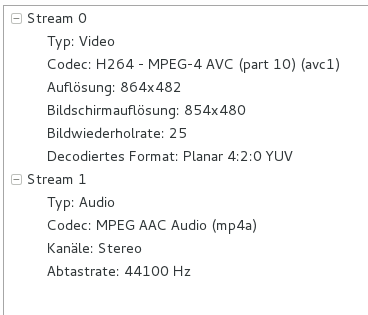
works. See Screenshot of the test.ts
Updated by C K almost 10 years ago
Sorry again, seems to be a problem with filmon.com and not TVH, it works great with youtube live streams